
Last updated on
Oct 31, 2026

CC 173-R 2005-2026 free printable template
pdfFiller is not affiliated with any government organization

Fill out
Complete the form online in a simple drag-and-drop editor.

eSign
Add your legally binding signature or send the form for signing.

Share
Share the form via a link, letting anyone fill it out from any device.

Export
Download, print, email, or move the form to your cloud storage.
Why pdfFiller is the best tool for your documents and forms


End-to-end document management
From editing and signing to collaboration and tracking, pdfFiller has everything you need to get your documents done quickly and efficiently.
Accessible from anywhere
pdfFiller is fully cloud-based. This means you can edit, sign, and share documents from anywhere using your computer, smartphone, or tablet.
Secure and compliant
pdfFiller lets you securely manage documents following global laws like ESIGN, CCPA, and GDPR. It's also HIPAA and SOC 2 compliant.
What is CC 173-R
The CC 173-R is a specific form used for reporting and tax-related purposes within designated frameworks.
pdfFiller scores top ratings on review platforms




Who needs CC 173-R?
Explore how professionals across industries use pdfFiller.

CC 173-R is needed by:
-
Tax professionals managing corporate filings
-
Businesses seeking to comply with tax regulations
-
Individuals involved in specific tax-related activities
-
Accountants preparing tax documentation
-
Consultants advising clients on tax responsibilities
Comprehensive Guide to CC 173-R
What is the CC 173-R?
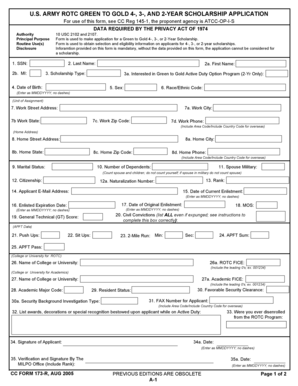
The CC 173-R is a specific form used primarily in the context of regulatory compliance. It serves to gather essential information relevant to certain requirements, ensuring that users meet necessary guidelines. The form is commonly referred to as the "CC 173-R form" and is integral for individuals needing to fulfill specific documentation needs.
Purpose and Benefits of the CC 173-R
The CC 173-R form is necessary for users to accurately report information that meets legal or procedural obligations. Completing this form correctly can help streamline processing and ensure compliance with relevant standards. Users often experience several benefits, including:
-
Reduction in processing delays due to accurate submissions.
-
Increased confidence in compliance with mandatory requirements.
-
Facilitation of necessary approvals from relevant authorities.
Who Needs to Complete the CC 173-R?
The target audience for the CC 173-R typically includes professionals and individuals in various sectors that require compliance documents. Common situations where this form is needed include:
-
Healthcare providers compiling necessary patient information.
-
Businesses seeking to adhere to regulatory requirements.
-
Individuals applying for permits or licenses.
Key Features and Functions of the CC 173-R
Notable features of the CC 173-R include specific mandatory fields that must be filled out for the form to be considered complete. Some key parts of the form are:
-
Identification details of the individual or organization.
-
Compliance-related declarations that need to be signed.
-
Sections dedicated to the review and verification of submitted data.
How to Fill Out the CC 173-R Online (Step-by-Step)
To fill out the CC 173-R form online, users can utilize the pdfFiller platform effectively. Here’s a step-by-step guide:
-
Access pdfFiller and search for the CC 173-R form.
-
Input all required information in the designated fields.
-
Review the form for accuracy and completeness before submission.
-
Submit the form electronically via the platform.
Ensuring accuracy and completeness is crucial to avoid delays in processing.
Common Errors and How to Avoid Them
During the completion of the CC 173-R, users often make common errors that can lead to complications. To reduce the likelihood of mistakes, consider the following practical advice:
-
Double-check all entries for accuracy before submission.
-
Ensure that all mandatory fields are filled out completely.
-
Review any guidelines associated with the CC 173-R to avoid misinterpretation.
Security and Compliance when Using the CC 173-R
When handling the CC 173-R, security is paramount. pdfFiller offers significant features to maintain user privacy and data protection:
-
256-bit encryption safeguards sensitive information.
-
Compliance with SOC 2 Type II, HIPAA, and GDPR regulations ensures data handling integrity.
These features help users feel confident and secure when managing their documentation.
Submission Methods for the CC 173-R
There are various methods available for submitting the completed CC 173-R form. Users can choose from:
-
Electronic submission via pdfFiller for immediate processing.
-
Mailing hard copies to the relevant authority if required.
-
Hand-delivering the form to facilitate direct communication.
Ensure that any necessary documents are included with the submission to avoid delays.
Tracking Your CC 173-R Submission Status
Users can track the status of their CC 173-R submission through the pdfFiller platform. If issues arise, it is recommended to:
-
Check the submission history available on the user dashboard.
-
Contact pdfFiller support if discrepancies occur or if additional information is needed.
Why Choose pdfFiller for Your CC 173-R Needs?
Choosing pdfFiller for completing the CC 173-R form offers unique advantages. The platform is designed to be user-friendly, ensuring that even those less familiar with digital forms can navigate easily. Users benefit from robust security and compliance features that protect their information while providing reliable support when needed.
How to fill out the CC 173-R
-
1.To access the CC 173-R form on pdfFiller, begin by navigating to the pdfFiller website and logging into your account.
-
2.Once logged in, use the search bar to locate 'CC 173-R' and select the form from the available options.
-
3.When the form opens, review the fields presented on the interface, noting any that contain placeholder text or instructions.
-
4.Gather the necessary information, such as financial details or identification numbers, before filling out the form to ensure accuracy.
-
5.Click on each field to enter the required information, making sure to fill out all mandatory fields marked clearly.
-
6.Utilize pdfFiller's features, such as the ability to save your progress, to avoid losing any entered information.
-
7.After completing the form, carefully review all entered data for errors or omissions, using the preview option for final checks.
-
8.Once satisfied, proceed to save or download the completed form in your preferred format for submission.
-
9.If submitting online, follow the prompts to send the form directly or check the designated submission method indicated within the form.

What is the deadline for submitting the CC 173-R form?
The CC 173-R form should be submitted by the designated tax deadlines that apply based on your filing situation. It's essential to check the latest IRS guidelines or consult a tax professional.
What are the eligibility requirements to use the CC 173-R form?
Eligibility for the CC 173-R form typically involves engaging in specific financial or tax-related activities. Ensure you confirm the requirements related to your status or role in the tax system.
What supporting documents are required for the CC 173-R form?
While specific documents may vary based on your situation, generally, you may need identification numbers, financial statements, or prior tax filings as supporting documents when completing the CC 173-R.
How can I submit the CC 173-R form?
The CC 173-R form can be submitted electronically through pdfFiller or printed and mailed to the appropriate tax agency. Follow the guidance provided within the form for the best submission method.
What common mistakes should I avoid when completing the CC 173-R form?
Common errors include incorrect data entry, missing required fields, and failure to review your work. Always double-check your information before finalizing the form.
How long does it take to process the CC 173-R form?
Processing times for the CC 173-R can vary based on the submitting agency’s workload and the correctness of your application. Generally, it may take several weeks, especially during peak tax seasons.
Is notarization required for the CC 173-R form?
No, notarization is not required for the CC 173-R form. However, ensure that all provided information is accurate and complete to avoid future issues.
Related Content
Related Forms




Related Catalogs
Get the latest insights from our blog


If you believe that this page should be taken down, please follow our DMCA take down process
here
.
This form may include fields for payment information. Data entered in these fields is not covered by PCI DSS compliance.